 Clear cookies
Clear cookies for one site
Delete cookies and site data for the current site in one click and stay logged in everywhere else. Built-in cookie editor for developers and testers.
What it does
Clears one website without touching the rest of your browser. Made for everyday privacy, web developers, SEO specialists and QA testers.
One-click cleanup
Click the toolbar icon and press Clear site data. The page reloads clean.
Keyboard shortcut
Press Alt+C (Option+C on macOS) to clear the current site without touching the mouse.
Floating button
An optional button in the corner of every page clears it in one click.
Cookie editor
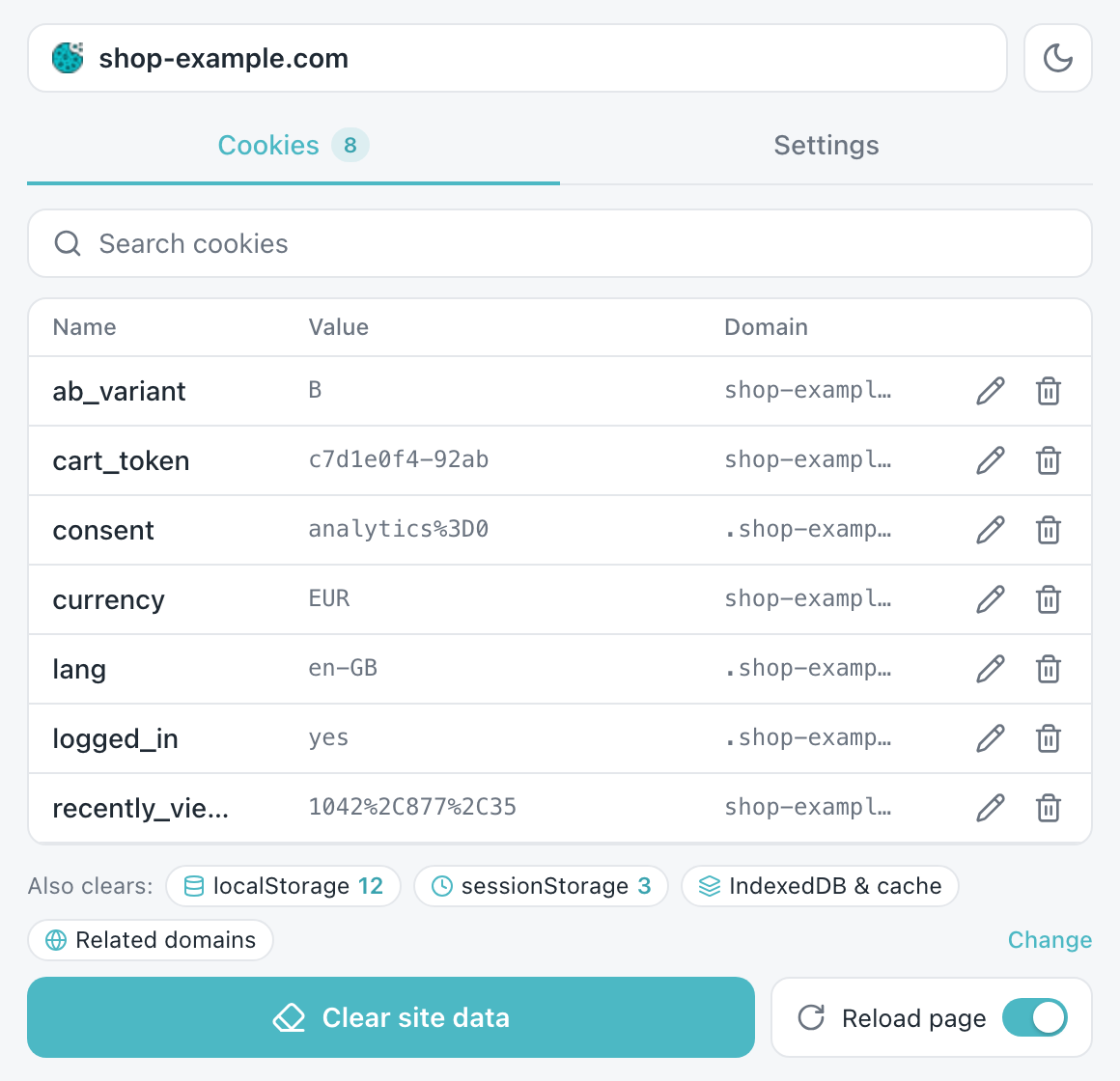
See every cookie of the page: name, value and domain. Edit, copy or delete a single record.
Full site storage
Also clears localStorage, sessionStorage, IndexedDB, cache storage and service workers.
Private by design
Everything happens in your browser. Cookies and site data never leave your device.
How to use
- Install the extension from the Chrome Web Store.
- Open the site you want to clean, for example a shop that keeps an old cart or a page that behaves oddly after an update.
- Click the icon or press Alt+C and press Clear site data. Cookies of other sites stay untouched.
Pricing
Basic cleanup is free forever. Pro unlocks the cookie editor, manager and full site storage cleanup.
Pro Monthly
- Everything in Free
- Cookie editor and manager with search
- Delete or copy single cookies
- localStorage, sessionStorage, IndexedDB, cache
- Billed monthly, cancel anytime
Pro Yearly
- Everything in Pro Monthly
- Billed once a year, cancel anytime
Upgrade from inside the extension: open it, choose a Pro feature and pick a plan. Prices in USD; local taxes may apply at checkout. Subscriptions renew automatically until cancelled; access continues until the end of the paid period. See the refund policy and terms of service.
FAQ
Will I be logged out of other websites?
No. Only the current domain and its subdomains are cleared. You stay logged in everywhere else.
Is the extension free?
Basic cleanup is free with no limits. The cookie editor, manager and extra storage cleanup are part of Pro.
What exactly can be cleared?
Cookies, localStorage, sessionStorage, IndexedDB, cache storage and service workers of the current domain. Choose what to remove in Settings.
Do you see my cookies or browsing data?
No. Everything runs locally in your browser. For Pro we only keep your email and subscription status.
How do I cancel my subscription?
Open the extension and click PRO at the top, or Manage in Settings. You can also use the link in your payment receipt or email us. Pro stays active until the end of the paid period.
Can I use Pro on several computers?
Yes. On another computer, open the extension, click Restore Pro in Settings and enter the email you paid with. We will send you a code to confirm it.
Need help or have a question?
Write to support@microext.com. We usually reply within 24 hours.